Full Private Label Rights Included! One Time Fee.
[plr] ChatGPT 5 Premium Prompt Generator
We turn GPT-5 into our repeatable revenue engine.
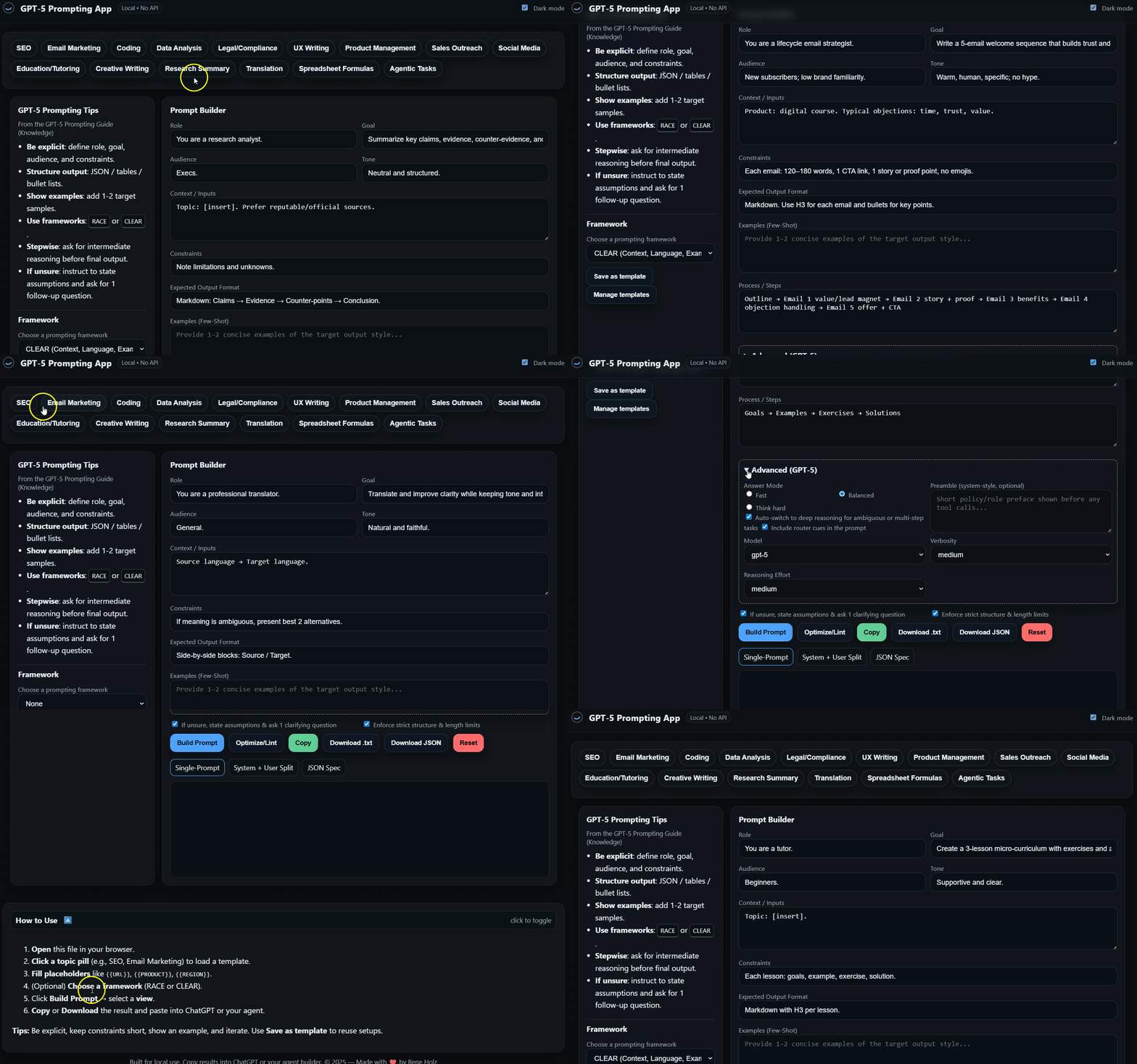
Here Is What This System Is Designed To Do
Create PLR-ready assets in minutes
Produce website copy, listings, emails, lesson plans, and checklists with built-in format contracts—easy to package, rebrand, and resell.
Provide a Ready-to-Sell Digital Product (Instantly)
We stopped dreaming about creating a digital product and actually built one. Now, with the PLR license, this professionally designed web app is yours to brand and sell as your own. We did the hard work, you keep 100% of the profits.
Unlock Multiple New Revenue Streams
We wanted this to be an asset that could unlock multiple revenue streams. That’s why the PLR license offers total freedom, so it can be sold as a standalone product, used as an irresistible lead magnet to build an email list, or bundled as a high-value bonus to sell existing courses and consulting packages.
Grant Total Control and Ownership
With a PLR license, this asset is 100% yours. There are no recurring fees, no royalties, and no restrictions. You have the freedom to modify it, brand it, and build your own business around it.
Turn “I don’t know what to ask” into a clear brief
One click on a preset gives you a clean structure (role, goal, tone, format, steps) so you start strong—even if you’re not a prompt pro.
Deliver consistent, repeatable results
The Split output (System/User) locks in rules and voice. Save it as a template and reuse it across clients, niches, or products.
What is ChatGPT5 Premium Prompt Generator + User Guide
1) What this tool does
Your builder creates clean, reliable prompts for GPT-5 in three formats:
Single Prompt – one compact prompt for chat UIs.
Split (System/User) – best for Custom GPTs, teams, and API use; rules in System, request in User.
JSON Spec – structured export including an
apiblock withmodel,verbosity,reasoning.effort, and optionalpreamble.
Goal: get high-quality, repeatable outputs fast—without prompt guesswork.
2) Quick start (3 minutes)
Name the task in one sentence
“Write a landing-section for [product] with one clear CTA.”Set Role & Audience
Role (e.g., Conversion Copywriter) and audience (e.g., SMB owners in EU, EN).Tone & Style
Choose something like Direct & concise (optionally add 1–2 reference voices).Constraints / Rules
Length, format (Markdown/JSON), must-have elements, must-avoid items.Examples (Few-Shot, optional)
Add 1 short positive example to “lock” quality.Process / Steps
3–5 bullets describing your micro-workflow + acceptance criteria (e.g., “includes a hook, 3 bullets, 1 CTA”).
Then open the Single tab (for chat) or Split tab (for system/user separation) and copy the output.
3) Inputs (what each field is for)
Role – the perspective/skillset you want (e.g., UX Writer, Analyst).
Goal / Task – the exact outcome you expect (not just “analyze”—say what to deliver).
Audience – who reads it (industry, maturity, language).
Tone & Style – the voice you want (and any style references).
Constraints / Rules – format contract, length, dos/don’ts, acceptance checks.
Examples (Few-Shot) – 1–2 short examples; huge quality boost.
Process / Steps – plan → draft → check → finalize; keep it short and testable.
4) Outputs (how to choose)
Single Prompt
Use this for a quick run in a chat box. Fastest path to results.Split (System / User)
System: rules, tone, output contract, any policy.
User: the specific request.
Use this when you need stability and consistency (Custom GPTs, team standards, APIs).
JSON Spec
Includes anapiblock (for power users/devs). If you’re only using chat, you can ignore it.
Example from JSON:
"api": {
  "model": "gpt-5 | gpt-5-mini | gpt-5-nano | gpt-5-chat-latest",
  "verbosity": "low | medium | high",
  "reasoning": { "effort": "minimal | medium | high" },
  "preamble": "optional system-style intro"
}
5) Advanced (GPT-5) — when to use which setting
Answer Mode
Fast – short, direct answers; great for snippets/templates.
Balanced (default) – good mix of speed and depth.
Think hard – for complex, multi-step, or high-stakes tasks.
Auto-switch
Lets the model escalate to deeper reasoning when the task is ambiguous or multi-step.Router Cues
Inserts subtle hints so GPT-5 chooses the right path (fast vs. deep). Keep on for most tasks.Model
gpt-5 – best overall quality and reasoning.
gpt-5-mini – faster/cheaper; very solid for most copy/tasks.
gpt-5-nano – very fast/light for simple tasks.
gpt-5-chat-latest – dialogue-focused (no heavier reasoning).
Verbosity
Controls answer length: low (brief), medium, high (comprehensive).Reasoning Effort
Controls depth/cost/time: minimal, medium, high.Preamble (optional)
A short system-style intro for policy/persona/compliance.
Example: “Respond factually, include sources when possible, and return only the final answer (no internal reasoning).”
6) Ready-to-use mini-recipes
A) Social hook + 3 bullets + CTA (FAST)
Mode: Fast, Verbosity: low, Effort: minimal
Constraints: ≤ 70 words, 0 emojis, 1 CTA.
Steps: Plan → Hook → 3 bullets → CTA → quick length check.
B) Product listing (marketplace)
Mode: Balanced, Verbosity: medium, Effort: medium
Constraints: Title ≤ 150 chars; 5 benefits (no duplicates); description 120–180 words; 10 tags.
Steps: Keywords → benefits > features → remove hype → finalize.
C) Front-end component copy (with acceptance tests)
Mode: Balanced, Verbosity: medium
Constraints: Markdown section + codeblock placeholder; include props/variants and acceptance criteria bullets.
Steps: Use-case → states → acceptance tests → example text.
D) Deep research brief (THINK HARD)
Mode: Think hard, Auto-switch: on, Verbosity: high, Effort: high
Constraints: outline, pro/cons, risks, open questions; no speculation.
Steps: questions & assumptions → structure → section drafts → quality checks.
7) Quality checklist
Too long/short? → adjust Verbosity.
Too slow/expensive? → lower Reasoning Effort (minimal/medium) or switch to Fast/Balanced.
Missed the goal? → sharpen Goal/Task + tighten Constraints.
Generic tone? → add 1 Few-Shot example.
Structure missing? → define a clear format contract in Constraints (e.g., Markdown headings, JSON keys).
Inconsistent results? → use Split and keep System steady.
Very long inputs? → in Process/Steps, instruct: chunk → summarize → synthesize (briefly describe this workflow).
8) FAQ
Single vs. Split?
Single for quick chat runs.
Split for repeatable, team-safe, or API scenarios (System = rules; User = request).
What does the JSON export add?
A tidy api block so power users can carry model/verbosity/reasoning/preamble settings into code or advanced setups.
What are Router Cues?
Subtle hints that guide GPT-5’s auto-router to pick fast vs deep paths appropriately.
Will I see the model’s internal thoughts?
No—your prompts ask for final answers only (no hidden chain-of-thought), which keeps outputs clear and safe.
9) Minimal workflow (always works)
Write the outcome in 1–2 sentences.
Define a format contract in Constraints (length, structure, dos/don’ts).
Add one Few-Shot example (optional but powerful).
List 3–5 Process/Steps with acceptance criteria.
Pick Advanced settings (Fast/Balanced/Think hard + Verbosity/Effort).
Copy Single or Split, run, iterate once if needed.
10) Troubleshooting
Output ignores parts of the brief → reduce scope, increase Verbosity, add acceptance criteria to Steps.
Inaccurate or hand-wavy → use Think hard + Effort: high; add a short “assumptions/limits” line in Constraints.
Overly flowery → set Tone to Direct & concise; add a style example.
Different answers each run → prefer Split and keep the System part unchanged.
Use Cases
Goal: A small local café wants a simple SEO to-do list for their website.
Click: SEO preset (pill at the top).
Fill these fields:
Goal: “Audit our café website and give a prioritized to-do list that improves how we show up on Google.”
Constraints:
Format: Markdown.
Sections: Quick Wins, On-Page Fixes, Technical Issues, Content Ideas, Internal Links.
End with a Top 10 actions table (Impact: High/Med/Low; Effort: Low/Med/High).
Keep language simple; no jargon.
Steps:
Review pages → Spot easy wins → Check titles & headings → Look for speed/mobile issues → Content ideas → Make top 10 table
Advanced (top-right “Advanced / GPT-5”)
Mode: Balanced
Verbosity: Medium
Reasoning Effort: Medium
Router Cues: On
Output: choose Split (System/User) and copy.
What you’ll get (sample of the result):
- Add your opening hours and phone number to the homepage header and footer.
- Create a Google Business Profile post with today’s special and a photo.
- Add “Café near [your area]” once in the homepage H1 or first paragraph.
## On-Page Fixes
– Page titles: keep ≤ 60 chars; include “Café” + neighborhood.
– Meta descriptions: 140–160 chars; mention parking, Wi-Fi, outdoor seating.
## Technical Issues
– Compress hero images (aim < 200 KB).
– Check mobile menu (ensure all pages are reachable).
## Content Ideas
– “Best coffee beans we use and why” (blog).
– “How we make our signature sandwich” (short post with photos).
## Internal Links
– Link “Menu” and “About us” from the homepage in the first screen.
### Top 10 Actions (Impact / Effort)
1. Fix page titles (High / Low)
2. Add hours + phone to header/footer (High / Low)
3. Compress hero images (High / Low)
4. Create GBP post with today’s special (Med / Low)
5. Add “near [area]” phrase on homepage (Med / Low)
6. Add menu PDF alt text (Med / Low)
7. Blog: beans we use (Med / Med)
8. Blog: signature sandwich (Med / Med)
9. Improve mobile menu (Med / Med)
10. Link to Menu + About in first screen (Med / Low)
Why this works: you clicked one preset, wrote a very short goal, told the tool the format you want, and set the “effort” and “verbosity.” The engine did the rest—clear steps, simple language, and a to-do list you can act on today.
Use Case — “Local Business Website & SEO Content Pack” (PLR)
What you’ll sell: a ready-to-use website copy + SEO pack for one niche (e.g., Dentist, Yoga Studio, Café).
Build time: ~60–90 minutes.
1) Click this in your app
Preset: SEO
Output: Split (System/User)
Advanced: Mode Balanced, Verbosity: Medium, Effort: Medium, Router Cues: On
2) Fill these fields (short & simple)
Goal: “Write website copy and basic SEO for a local [niche] website.”
Constraints (paste this):
Deliver:
1) Homepage (hero, 3 benefits, CTA)
2) Services page (3–5 services, short blurbs)
3) About page (story + trust points)
4) FAQ (10 items)
5) Contact page (clean fields)
6) SEO: page titles + meta descriptions
Keep it warm, simple, and local-friendly. No jargon.
Steps (paste this):
Outline → Write each page → Add SEO titles/meta → Final QA checklist
3) Click Build, copy the Split output, paste to ChatGPT, get your content.
4) What to package & sell (PLR)
/Website-Copy/ homepage.md, services.md, about.md, faq.md, contact.md
/SEO/ titles_meta.xlsx (or .csv you copy/paste)
/Branding/ style-notes.md (voice, tone, CTA examples)
License: PLR (buyers may rebrand/edit and use for clients).
Suggested price: $17–$47 per niche pack; bundle 3 niches at $57–$97.
Tiny sample (Services page snippet)
## Teeth Whitening
Brighter teeth in one visit. Gentle care, quick results, no downtime.
**Best for:** stains from coffee, tea, or wine.
**Time:** about 60 minutes.
**Next step:** Book a free shade check.
## Checkups & Cleaning
Prevention beats pain. A simple visit keeps gums healthy and smiles bright.
**Includes:** exam, cleaning, polishing, home-care tips.
Use Case — “Kids Coloring & Activity Book + Etsy/KDP Listing” (PLR)
What you’ll sell: a 25-page kids pack (coloring + simple activities) plus done-for-you product listings.
Build time: ~60–120 minutes (text + prompts); image creation can be done with your favorite tool.
1) Click this in your app
Preset: Education/Tutoring (for activities) + Creative Writing (if you want short intros)
Output: Single for quick copy, or Split for consistency
Advanced: Mode Balanced, Verbosity: Medium, Effort: Minimal
2) Fill these fields
Goal: “Create a 25-page Kids Pets coloring & activity pack (ages 5–8).”
Constraints (paste this):
Deliver:
A) 25 prompts for black-and-white coloring (clean outlines, kid-safe)
B) 10 simple activities (mazes, spot-the-difference, word finds)
C) 1-page parent intro (benefits, ages, printing tips)
D) Etsy/KDP listing: title, 10 tags, 180-word description (no emojis)
Steps (paste this):
List 25 coloring prompts → List 10 activities → Write parent intro → Write Etsy/KDP listing
For images: paste each coloring prompt into your image tool to generate the line art; compile as a PDF (A4/Letter).
3) What to package & sell (PLR)
/Prompts/ 25_coloring_prompts.txt (ready to paste into your image tool)
/Activities/ 10_activities.md
/Book/ parent_intro.md, print-tips.md, compiled pets_coloring_activity.pdf
/Listing/ etsy_title_tags_desc.md
License: PLR (buyers can rebrand/edit; you may restrict passing on PLR if you want—state this clearly).
Suggested price: $17–$37 per theme; bundles at $47–$97.
Tiny sample (3 coloring prompts + listing)
Coloring Prompts (examples)
1) Happy puppy sitting with a ball, clean bold outlines, simple background.
2) Cat on a windowsill with a butterfly outside, large shapes, no tiny details.
3) Goldfish bowl with bubbles and seaweed, thick lines, kid-safe.
Etsy Title:
Kids Pets Coloring & Activity Pack (Ages 5–8) — 25 Pages Printable PDF
Tags (10):
kids coloring, pets coloring, printable, activity book, puppy, kitten, maze, spot the difference, homeschool, gift
Description (excerpt, ~180 words):
This printable Kids Pets Coloring & Activity Pack includes 25 pages… easy-to-color outlines… simple activities like mazes and spot-the-difference…
Optional upsells you can suggest to your PLR buyers
Bundle 3 niches or themes (e.g., Dentist + Chiropractor + Physical Therapy; or Pets + Farm + Ocean).
Add matching social posts (use “Social Media” preset to output 7 ready-to-post captions).
Add a mini email funnel for buyers (use “Email Marketing” preset; 5 welcome emails).
Use Case — Make a tiny lesson plan (education/tutoring)
Goal: A tutor needs a 3-lesson mini-course: “Spanish for Travelers.”
Click: Education/Tutoring preset
Fill
Goal: “Create 3 short lessons with exercises and answers: Spanish for Travelers.”
Constraints:
Each lesson: goals, 3–5 phrases, 2 exercises, answer key.
Keep language simple. Focus on speaking, not grammar theory.
Steps: Set lesson goals → Give phrases → Add 2 exercises → Provide answers → 5-minute practice routine
Advanced: Mode = Balanced · Verbosity = Medium · Effort = Minimal · Router Cues = On
Output: Split
Sample (Lesson 1 – Greetings & Basics)
### Goals
– Say hello/goodbye/please/thank you
– Ask “Do you speak English?” and “Where is…?”
### Phrases
Hola • Adiós • Por favor • Gracias
¿Habla inglés? — Do you speak English?
¿Dónde está el baño/la estación?
### Exercises
1) Fill in: “____, ¿dónde está el baño?”
2) Translate: “Do you speak English?”
### Answers
1) Hola / Por favor
2) ¿Habla inglés?
### 5-minute practice
Say each phrase aloud 3×; do a quick role-play (ordering coffee).
Hey Marketer & PLR Friend: The Day I Stopped Prompting and Started Shipping
I wake up already behind.
Phone face-down on the nightstand, but my brain is scrolling anyway: a dozen half-ideas, three client to-dos, that PLR bundle I swore I’d finish “yesterday.” Coffee. Another coffee. I open a chat window and type a prompt that sounds smart in my head and lands like soup in the bowl—warm, vague, and useless.
I try again. Longer this time. “Be concise but detailed.” (What does that even mean?) The answer is pretty, confident, and completely off. I copy, paste, tweak, sigh, delete. Check email to feel productive. I’m not. It’s 10:17 a.m. and I’ve created exactly nothing anyone can use.
So I do what I always do when I feel behind: I think harder. Which is my code for staring at the screen until lunch.
By noon I’ve convinced myself that today is one of those “research” days. (It isn’t. It’s an avoidance day with a costume on.) The worst part? GPT-5 is sitting right there—powerful, polite, and perfectly willing to waste my time if I let it.
The “aha” didn’t come as a lightning bolt. It was a drip.
It started when I opened the bookmark I labeled “Emergency Mode.” It’s the GPT-5 Prompting App. Not another chat. Not a magic “write it for me” button. Just a little structure that stops me from doing the dumb thing: treating a serious job like small talk.
At 12:06 I click Sales Outreach at the top—one of those Quick-Start buttons that loads a working brief in a second. I type a single line:
“Write 3 short cold emails to book intro calls for weekly home cleaning.”
In Constraints I add, “≤120 words, one CTA, no hype, personalize by problem.” In Steps I paste: “Pick 3 angles → Write → Edit to ≤120 → Soft CTA.”
On the right I flip Balanced mode, Verbosity: Medium. That’s it.
I press Build and open Split.
Suddenly the screen isn’t arguing with me. It’s telling me exactly what to ship: three tight emails that sound like an adult wrote them. Same voice, same format, no drift. I don’t even fight the urge to “improve” them. I paste, tidy a name, add a booking link, done.
It’s 12:24. I haven’t had to be a copywriting poet. I just had to stop chatting and start briefing.
Momentum does something to the room.
At 1:10 I click SEO and ask for “a prioritized to-do list for a neighborhood café’s website.” I add a Top-10 table rule to Constraints and keep Balanced. Two minutes later I have a clean plan with quick wins, titles/meta, content ideas, internal links—the kind of thing a business owner can act on without squinting. I send it. “This is exactly what we needed,” comes back. I’ll pretend that was me, but we both know it was the format doing the heavy lifting.
By 2:30 I’m chasing a different rabbit—the PLR pack I’ve been putting off. I click Education/Tutoring and tell it, “Create a 25-page ‘Pets’ coloring & activity pack (ages 5–8).” The app hands me a tidy list of 25 coloring prompts, 10 simple activities, a parent intro, and a ready listing description. I drop the prompts into my image tool, compile a PDF, save the listing text. That would have taken me an afternoon of wandering; it takes an hour when the steps are already decided.
There’s a feeling you get when the page stops being a fight. It’s not euphoria. It’s relief. Like the hallway light finally comes on and you can see where your feet go.
I didn’t get smarter today. I got deliberate.
The trick is boring on purpose: one click to load a proper brief, two lines to say what I want, a format contract so the output behaves, and a toggle to choose fast or deep. When I need speed, I flip to Fast; when I need careful work, I flip to Think hard. When I want consistency, I use Split so rules live in System and the request lives in User. And the part I used to ruin with “one more tweak”? I don’t. I ship it.
Around 4:10 a PayPal ping lands for a mini-bundle I finished between coffees. The timing isn’t magic. It’s the kind of result that happens when the page stops eating hours and starts giving you assets: emails that book calls, SEO plans owners understand, a PLR pack that doesn’t sit unfinished in a folder called “later.”
My day ends different than it started. Not because GPT-5 suddenly became a genius. Because I stopped treating it like a muse and started using a system that makes it work like a team.
Tomorrow morning I’ll wake up the same as always: ideas buzzing, coffee in hand, tempted to “just ask the model something” and see where it goes. And then I’ll click a preset, write one sentence, set the dials, and watch the page hand me something shippable.
That’s the real “aha.” Not inspiration. Control.
If you want that too, open the app. One click in. Business-ready out.
10 Quick Wins
“I don’t know how to ask.”
Click: Research Summary
Do: Write 1 clear goal (what you want) and 3 bullet “must-haves.”
Tip: Use Split output for best results.“Answers change every time.”
Click: any preset → use Split.
Do: Put rules in System. Keep User for your changing request.
Tip: Save as Template once it looks right.“It sounds generic, not like us.”
Click: Email Marketing or Social Media
Do: Paste 2–3 sample lines in Examples that sound like your brand.
Tip: Fast mode + Verbosity: low for punchy copy.“Too long / too short.”
Click: any preset
Do: In Constraints, say the length (e.g., “120–150 words”).
Tip: Set Verbosity to low/medium/high to match.“I need sources, not guesses.”
Click: Research Summary
Do: In Constraints, add: “cite 3 reputable sources; list limits.”
Tip: Use Think hard + Effort: high for careful work.“Tables or JSON are messy.”
Click: Data Analysis or Spreadsheet Formulas
Do: In Constraints, spell out the exact columns/keys you want.
Tip: Add “follow structure strictly.”“I have a long document.”
Click: any preset
Do: In Steps, add: “chunk → summarize → final summary.”
Tip: Think hard for better accuracy on long text.“This is a multi-step job.”
Click: Agentic Tasks
Do: Steps: “Plan → Do → Check → Fix (once) → Final.”
Tip: Keep it short; the engine handles the flow.“We need app/website microcopy (no fluff).”
Click: UX Writing
Do: In Constraints, set “max 45 characters; clear; no jargon.”
Tip: Add acceptance criteria (what “good” looks like).“Quick translation that keeps the meaning.”
Click: Translation
Do: Add: “If unclear, show 2 best options.”
Tip: Keep Verbosity: low for tidy results.
Our Biggest Realization: We Stopped Selling PDFs and Started Selling Software.
We had to be honest with ourselves. The market is flooded with PLR ebooks. They’re a great start, but we knew our customers were drowning in PDFs they never read.
That’s why we created something fundamentally different.
With this license, you’re not just getting the rights to a document; you’re getting the rights to a fully-functional web application. We found this to be a far more valuable and rare opportunity. Selling a software tool with PLR elevates the seller to a completely different level:
Premium Pricing: We learned that a software “prompt generator” has a much higher perceived value than an ebook, allowing for prices 2x, 5x, or even 10x higher than a simple PDF.
Recurring Revenue: We saw the opportunity to host the generator and sell access to it as a monthly subscription. Instead of a one-time sale, this model builds a predictable, scalable income source.
Market Differentiation: While many others are offering the same ebooks, this provides a unique, interactive tool that actually does something for customers. It’s an instant differentiator.
A Powerful Core Offer: This isn’t just a bonus; it’s a flagship product. We designed it so an entire brand, membership, or coaching program could be built around this unique, interactive software asset.
The Nano Banana Prompt Generator isn’t just another digital product. It’s a chance to leapfrog the competition and start selling a real software solution, without writing a single line of code.
We Wanted a World-Class Marketing Team on Call, 24/7... For a One-Time Fee.
We were tired of blank pages, moving deadlines, and “maybe tomorrow.” We wanted the feeling of a top-tier team on call—the strategist who frames the brief, the copy chief who keeps the voice tight, the analyst who insists on structure—available any hour, without subscriptions, retainers, or roulette.
So we built the GPT-5 Prompting System.
It loads a working brief in one click, splits rules from requests so results stop drifting, and lets us choose Fast when speed matters or Think hard when accuracy does. We don’t “chat.” We ship. Emails that book calls. SEO plans owners actually follow. Lesson packs and listings that become products the same day.
It feels like having an A-team in the next room: consistent voice, clean formatting, clear acceptance criteria. No scheduling. No payroll. No waiting.
And because we believe tools should pay for themselves, we priced it once—so you keep the upside. Use it for client work, your own brand, or to assemble PLR-ready assets you can sell and resell. No monthly meter. Just a dependable system that turns ideas into deliverables, whenever you need it.
If that’s the kind of leverage you’ve been looking for, this is where it starts: one click in, business-ready out—24/7, for a one-time fee.
How It Works: 1, 2, 3 BOOM...
Click a preset.
Pick the button that fits your task (SEO, Sales Emails, Education, etc.).Tell it what you want (one line).
Type a short goal: “Write 3 cold emails for house cleaning” or “Make a café SEO to-do list.”Set the rules (1–3 lines).
In Constraints, say length, format, and any must-haves (e.g., “≤120 words, 1 CTA, no emojis”).Choose speed or depth.
In Advanced, pick Fast, Balanced, or Think hard, and set Verbosity (short / medium / long).Build and copy.
Use Single for quick chat use, or Split for consistent results (System = rules, User = request). Copy the output.Ship (and save).
Paste where you need it, make tiny edits, and ship. Save the setup as a Template to reuse.
PLR tip: bundle the outputs (copy, checklists, listings) into a simple folder and sell.
Here’s How We've Seen Marketers Get Their Time Back:
Case Study #1: The Overbooked Social Media Freelancer
The Pain: Lena spent 6–8 hours per client building a week of posts. She was capped at 4 clients and always behind.
The Solution: She clicked the Social Media preset, set constraints (120–180 words, 1 CTA, no emojis), and saved a Split template. Each Monday she loads the preset, swaps the theme, and hits Build.
The Result: Her weekly plan per client now takes ~45 minutes. She comfortably manages 9 clients without late nights—and her retainers went up.
Case Study #2: The PLR Seller Who Finally Shipped
The Pain: Jordan had ideas for a “Kids Pets” pack but kept stalling—no structure, messy listings, no momentum.
The Solution: He used Education/Tutoring to generate 25 coloring prompts + 10 activities, then Social and Email Marketing to create the listing copy and a 5-email welcome sequence.
The Result: He packaged a clean 25-page PLR product in a weekend and launched on Etsy + his list. First sales came in the same week; now he clones the workflow for new themes.
Case Study #3: The Local Service Owner Who Needed Calls
The Pain: Priya ran a home-cleaning service with a dry inbox. Cold outreach felt awkward and time-consuming.
The Solution: She clicked Sales Outreach, set ≤120 words, 1 soft CTA, and picked 3 angles (speed, trust, reliability). She kept Balanced mode and used Split for consistency.
The Result: She sent three tidy emails and booked her first week of intro calls without hiring a copywriter.
Examples are for illustration; results vary based on niche, offer, and effort.
But We're Not Just Selling a Tool... We're Handing You a Complete, Ready-to-Sell Business.
This offer is different. When you get the GPT5 Premium Prompt Generator today, you’re also getting Full Private Label Rights (PLR).
This means this entire web app and the principles behind it become your asset.
Here’s how we used this single asset to create multiple streams of income:
We sold the Prompt Generator as its own product: We put our branding on it and sold it directly, keeping 100% of the profits from every sale.
We used it as an irresistible lead magnet: We offered the generator for free to build a massive, high-quality email list of marketers and business owners who were eager for a real tool, not just another PDF.
We bundled it as a high-value bonus: We used the generator to dramatically increase the value and conversion rate of our existing courses and coaching packages. It became the “can’t-say-no” bonus that closed the deal.
We created a paid membership around it: We used the app as the foundation for a membership community, providing ongoing support and new prompting strategies to a recurring customer base.
We’ve done all the work: the strategy, the design, the development, the content. It’s a business-in-a-box waiting for you to turn the key.
Get Your Unfair Advantage Today
You have a choice. You can continue on the content treadmill, trading precious time for “good enough” marketing that isn’t moving the needle.
Or you can grab the tool that will save you 10+ hours a week, elevate your work to a new professional standard, and give you a ready-made digital product with FULL PRIVATE LABEL RIGHTS.
Click the button below to get instant access to the GPT5 Premium Prompt Generator with a full Private Label Rights license.
To your strategic future,
The Custom GPT5 Team
P.S. Every minute you spend doing grunt work is a minute you’re not operating as the high-value strategist your clients need. This software changes that equation forever.